Mastering Your Sublimation Projects with the Patriotic 3D Owl Tumbler Wrap PNG
There is a distinct satisfaction in holding a custom tumbler that looks professionally made, especially when it features a design that captures the spirit of a holiday like the Fourth of July. For creators, small business owners, and hobbyists alike, the Patriotic 3D Owl Tumbler Wrap PNG 1 offers a fantastic starting point for crafting high-quality, festive drinkware. This digital asset combines the charm of watercolor birds with a modern 3D aesthetic, creating a seamless pattern that wraps beautifully around a 20 oz skinny tumbler. However, possessing a high-resolution file is only half the battle. Many enthusiasts rush into printing without fully understanding the nuances of sublimation, leading to wasted blanks, faded colors, or misaligned graphics. By approaching this project with a bit of foresight and technical awareness, you can ensure your final product matches the vibrant promise of the digital download.
Understanding the Digital Asset and Its Potential
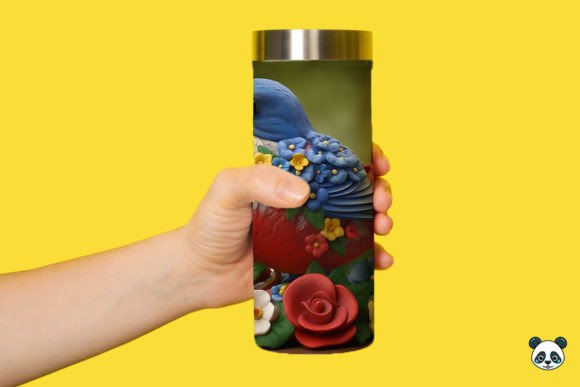
Before you fire up your printer, it is essential to understand exactly what you are working with. The Patriotic 3D Owl Tumbler Wrap PNG 1 is not just a picture; it is a specialized template designed specifically for the curvature and dimensions of a straight, 20 oz skinny tumbler. The file typically arrives as a high-resolution PNG, often around 9.3 inches by 8.2 inches at 300 DPI. This resolution is critical because sublimation requires crisp details to transfer correctly onto polyester-coated surfaces. The design features a patriotic bird theme, utilizing reds, whites, and blues in a 3D style that adds depth and visual interest compared to flat vector art.
Creators often overlook the value of the "seamless" nature of the background included in these packs. A seamless pattern allows the design to flow continuously around the cup without an obvious break or awkward edge, provided it is aligned correctly during the wrapping process. When used effectively, this design element elevates a simple DIY project into something that looks like it came from a high-end boutique. Whether you are making gifts for family or inventory for an Etsy shop, recognizing the quality of the source file helps set the standard for your production workflow.
Common Pitfalls in File Preparation and Printing
One of the most frequent mistakes beginners make involves assuming that "instant download" means "instant perfection." Just because you have purchased the Patriotic 3D Owl Tumbler Wrap PNG 1 does not mean you can skip the preparation phase. A common error is printing the image at its default size without checking the actual dimensions against your specific tumbler blank. While the file is sized for a standard 20 oz skinny tumbler, manufacturing tolerances vary between brands. If you print without measuring your specific blank, you might find the wrap is slightly too short, leaving a gap, or too tall, causing the ink to bleed onto the rim or base.
Another significant oversight occurs during the color management stage. Sublimation printers often produce colors on paper that look duller than the final result on the tumbler, yet many users try to over-saturate the image in editing software to compensate. This can lead to muddy colors and loss of detail in the 3D elements of the owl design. Instead of guessing, it is far more effective to run test prints on plain paper first. Wrap the test print around your tumbler to check the fit and visualize the color density. This simple step saves money on expensive sublimation paper and coating blanks.
Furthermore, neglecting the mirror image setting is a classic blunder. Sublimation transfers must be printed in reverse (mirrored) so that when they are applied to the tumbler, the text and orientation appear correct. Failing to mirror the Patriotic 3D Owl Tumbler Wrap PNG 1 before printing will result in a backward design, rendering the tumbler unusable for professional sales or gifting. Always double-check your print settings dialog box before hitting the final print button.
Application Errors That Compromise Quality
Even with a perfect print, the application process holds its own set of traps. Heat pressure and timing are variables that cannot be ignored. A frequent issue is uneven heat distribution, often caused by using a heat press that does not fully accommodate the height of a 20 oz tumbler or using a heat gun inconsistently. If the pressure is too light, the ink will not penetrate the polymer coating deeply, leading to a design that feels rough to the touch and may peel or fade after washing. Conversely, excessive pressure can crush the tumbler or cause ghosting, where parts of the design appear double-exposed due to movement.
Temperature accuracy is another area where assumptions can be costly. Different ovens and heat presses have different calibration levels. Relying solely on the dial setting rather than using an independent thermometer can lead to under-curing or burning the paper onto the blank. For the best results with a 3D design like the owl wrap, consistent heat is key to activating all layers of the dye. Additionally, failing to use high-temperature tape securely can allow the transfer paper to shift mid-process. Even a millimeter of movement can ruin the seamless alignment of the background pattern, creating a visible seam line that breaks the immersion of the design.
Post-press handling is also frequently mishandled. Many eager creators peel the paper off while the tumbler is still piping hot. This thermal shock can cause the ink to crack or the coating to cloud. The best practice is to let the tumbler cool down naturally to room temperature before removing the paper. This ensures the ink has fully set within the coating, resulting in a glossy, durable finish that withstands daily use.
Strategies for Professional Results
To avoid these common pitfalls and maximize the potential of your Patriotic 3D Owl Tumbler Wrap PNG 1, adopt a methodical approach. Start by verifying the file specifications immediately after download. Ensure you have the correct ZIP file containing the high-DPI PNG. Open the file in your design software and confirm the dimensions match your physical blank. If necessary, adjust the canvas size slightly to account for any specific overlaps you prefer, but maintain the aspect ratio to prevent distorting the 3D owl.
Invest time in creating a "cheat sheet" for your specific equipment. Record the exact time, temperature, and pressure settings that yield the best results for your brand of tumblers. Since sublimation is a chemical process influenced by environmental factors, what works for one person might need slight adjustment for another. Keep a log of your successful runs. When working with intricate backgrounds like the watercolor bird pattern, consider using a Teflon sheet or butcher paper over the transfer to protect your heating element and ensure even pressure distribution across the entire surface.
Finally, remember that the value of this digital download lies in its versatility. While it is marketed for the Fourth of July, the patriotic color scheme and bird motif can be adapted for various summer events, Memorial Day celebrations, or even general Americana-themed collections. By treating the file as a premium component in your production line and respecting the technical requirements of sublimation, you transform a simple digital purchase into a tangible, high-value product. Taking these corrective steps not only improves the quality of your individual items but also builds your reputation as a reliable creator who delivers excellence.